After listening to Dr. Tom Savel speak to our class about what the CDC was doing with mobile app development, what I found most surprising and fascinating, was how much time, effort and thought goes into creating a user experience.
I didn't think that creating a user experience was going to be easy but I also didn't realize what goes into making a 70 page pdf document into a mobile app. Some of the decisions that need to be made include:
- how to categorize the document (by topics, by chapter, etc)
- how to allow the user to choose the category (list alphabetically, create icons for each category, etc)
- once a user clicks on a category, how is that information displayed? does it read like a book? are there a list of sub topics to click on? should those sub categories be in a list or have icons?
- should topics be cross references? if so, how?
- should there be a back button, a forward button, a 'go to the beginning' button, a 'go to the end' button?
- should there be storage of a users history? If so how? how will they access?
- should there be a home button? where? on the screen at all times?
These questions just hit the surface of all the questions that a team must ask themselves before creating a web app.
Doctors and other health professionals having access to information literally in the palm of their hand, is an amazing concept and I think the field of Health Informatics is only going to grow. I have noticed in the past year or two, my doctors have all converted from written charts to carrying laptops and inputting all information there, I can just imagine mobile being the next step in electronic health records.
Thursday, July 26, 2012

Tuesday, July 10, 2012
Google I/O conference session 2012
The Google I/O conference was held on June 27-29, 2012. Videos of their sessions are posted at http://developers.google.com/events/io/sessions. The session I listened to was titled "The next generation of social in the hangout." Developers discussed Google + hangout, how it came about and how it is used.
I found this session fascinating. I have used Google hangout only a couple of times for a group project for school. I thought it was pretty cool but never really stopped to think about he possibilities.
The developers talked about a Hangout as being the new way to do social. Mimicking real life but having everyone actually there where they can be seen as if everyone was at a conference table. Hangouts have been used to give cooking demos, guitar lessons and to show power point presentations.
Google hangout is being used more and more for business collaboration so the Docs app was added so colleagues could share documents, live in real time.
The Google hangout API can be used to:
- build activities inside hangouts
- build enhancements for live conversations
- bring Google + hangout to your app
Examples for companies that have incorporated the Google Hangout API are:
- Aces Poker, which lets everyone sit around a table and play poker and when it is your turn, your camera displays you in the big center square for everyone to see your "poker face".
- Scoot and Doodle - where a group of people can sit around the same canvas and draw, play pictionary or make a collaborative work of art.
To create an application using Google + hangout, go to http://developers.google.com/+/hangouts and start new application.
Google + is free, web based software that could truly change the way businesses conduct meetings, the way presentations are made, the way friends meet, the way students ask for help and so on. The possibilities seem endless.
I found this session fascinating. I have used Google hangout only a couple of times for a group project for school. I thought it was pretty cool but never really stopped to think about he possibilities.
The developers talked about a Hangout as being the new way to do social. Mimicking real life but having everyone actually there where they can be seen as if everyone was at a conference table. Hangouts have been used to give cooking demos, guitar lessons and to show power point presentations.
Google hangout is being used more and more for business collaboration so the Docs app was added so colleagues could share documents, live in real time.
The Google hangout API can be used to:
- build activities inside hangouts
- build enhancements for live conversations
- bring Google + hangout to your app
Examples for companies that have incorporated the Google Hangout API are:
- Aces Poker, which lets everyone sit around a table and play poker and when it is your turn, your camera displays you in the big center square for everyone to see your "poker face".
- Scoot and Doodle - where a group of people can sit around the same canvas and draw, play pictionary or make a collaborative work of art.
To create an application using Google + hangout, go to http://developers.google.com/+/hangouts and start new application.
Google + is free, web based software that could truly change the way businesses conduct meetings, the way presentations are made, the way friends meet, the way students ask for help and so on. The possibilities seem endless.
Wednesday, March 28, 2012
Big Data
What is Big Data?
Previously, we have always thought of data as set of relational databases neatly packed in tables.
Today, we have data coming from the internet, social networking sites, online shopping sites, mobile devices, cell phones, text messaging just to name a few. Where does this data go? How can it be stored, indexed, packaged, queried and how can any one technology keep up with the volume? All of these questions have lead to the term "Big Data".
Big Data is defined by Wikipedia as " data sets whose size is beyond the ability of commonly used software tools to capture, manage, and process the data within a tolerable elapsed time. Big data sizes are a constantly moving target currently ranging from a few dozen terabytes to many petabytes of data in a single data set"
What are "No SQL" databases? Why are they important?
No SQL databases are databases that are structured much differently than the traditional rational databases. Key components of a "No SQL" database include:

 A current leader in No SQL technology of handling Big Dat is The Apache™ Hadoop™ project which has developed open-source software for reliable, scalable, distributed computing.
What is Pig?
.bmp)
Apache Pig is a platform for analyzing large data sets. Pig's language, Pig Latin, lets you specify a sequence of data transformations such as merging data sets, filtering them, and applying functions to records or groups of records.
What is Hive?
.bmp)
Hive is a data warehouse system for Hadoop that facilitates easy data summarization, ad-hoc queries, and the analysis of large datasets stored in Hadoop compatible file systems. Hive provides a mechanism to project structure onto this data and query the data using a SQL-like language called HiveQL.

Previously, we have always thought of data as set of relational databases neatly packed in tables.
Today, we have data coming from the internet, social networking sites, online shopping sites, mobile devices, cell phones, text messaging just to name a few. Where does this data go? How can it be stored, indexed, packaged, queried and how can any one technology keep up with the volume? All of these questions have lead to the term "Big Data".
Big Data is defined by Wikipedia as " data sets whose size is beyond the ability of commonly used software tools to capture, manage, and process the data within a tolerable elapsed time. Big data sizes are a constantly moving target currently ranging from a few dozen terabytes to many petabytes of data in a single data set"
What are "No SQL" databases? Why are they important?
No SQL databases are databases that are structured much differently than the traditional rational databases. Key components of a "No SQL" database include:
- Easy to use in conventional load-balanced clusters
- Persistent data (not just caches)
- Scale to available memory
- Have no fixed schemas and allow schema migration without downtime
- Have individual query systems rather than using a standard query language
Three key drivers have created an interest in Big Data and No SQL.
- Data from Social Networking and Web 2.0 sites
- Data changes over time and many data models don't evolve to keep pace with the changes in data
- No SQL technology is becoming a comodity therefore everyone can get it and use it relatively easily.
The following table and website, compare the different companies that are offering No SQL technologies, they include Amazon Web Services, Google Big Table and mongo DB.

What is Hadoop?

Hadoop's software library allows for the distributed processing of large data sets across clusters of computers using a simple programming model.
What is Pig?
Apache Pig is a platform for analyzing large data sets. Pig's language, Pig Latin, lets you specify a sequence of data transformations such as merging data sets, filtering them, and applying functions to records or groups of records.
What is Hive?
Hive is a data warehouse system for Hadoop that facilitates easy data summarization, ad-hoc queries, and the analysis of large datasets stored in Hadoop compatible file systems. Hive provides a mechanism to project structure onto this data and query the data using a SQL-like language called HiveQL.
Big Data is a growing problem and a growing opportunity. With so much data being transmitted through so many different means, companies are constantly looking for ways to manage the increasing volume (amount of data), velocity (speed of data in/out), and variety (range of data types, sources) of data.

Wednesday, March 21, 2012
Lean Primer - Summary and Review
Lean Primer by Craig Larman and Bas Vodde
This article describes "lean thinking" and the "Toyota Way". Lean thinking is a proven system that applies product development and production used by Toyota and other companies.
The best way to describe lean thinking is to view the following graphic:
 The foundation of the house is management and its long term philosophy. The "pillars" are two important priorities for Toyota, being "Respect for People" and "Continuous Improvement". The "heart" is a combination of Product Development and the 14 Principles. And finally on the top is the roof which represents the successes of this process.
The author sees "lean" as a broad system that spans all groups and functions of a company. Everything from product development, sales, production, IT and HR. The chairman of Toyota believes that these tools must be practiced consistently and used every day in order to be effective.
I think this type of lean thinking can be extremely effective if implemented correctly but I feel this implementation would be very difficult.
It feels very rigid to me and doesn't allow for flexibility in thought, management style, skill set or philosophy. An organization would have to be very strict and rigid in its rules and regulations for this type of "lean" thinking to work. If it does work however, I think it can be very successful because every part of the organization is working for the same goals and end results.
This article describes "lean thinking" and the "Toyota Way". Lean thinking is a proven system that applies product development and production used by Toyota and other companies.
The best way to describe lean thinking is to view the following graphic:

The author sees "lean" as a broad system that spans all groups and functions of a company. Everything from product development, sales, production, IT and HR. The chairman of Toyota believes that these tools must be practiced consistently and used every day in order to be effective.
I think this type of lean thinking can be extremely effective if implemented correctly but I feel this implementation would be very difficult.
It feels very rigid to me and doesn't allow for flexibility in thought, management style, skill set or philosophy. An organization would have to be very strict and rigid in its rules and regulations for this type of "lean" thinking to work. If it does work however, I think it can be very successful because every part of the organization is working for the same goals and end results.
What is BPM? A Summary and Review
Summary of the Article, What is Business Process Management by Michael Hammer
Michael Hammer writes, "Business Process Management (BPM) is a comprehensive system for managing and transforming organizational operations, based on what is arguably the first set of new ideas about organizational performance since the Industrial Revolution."
1. Origins of BPM
Two primary schools of thought led to today's BPM systems. First is the work of Shewhart and Deming on statistical process control which led to today's more sophisticated Six Sigma. These systems rely on the use of performance metrics to determine whether work is performed satisfactorily or not, reliant on hard data rather than opinion. Limitations for this process include, its definition of a process leads to an organization to have hundreds of processes that may or may not have significance to the enterprise as a whole, yet all have to be measured and evaluated.
Another school of thought was the authors, Michael Hammer called Reengineering. Reengineering redefined process as being end to end work across an enterprise that creates customer value and focusing only on the meaningful processes.
2. The Process Management Cycle
Over the last decade, these to processes have merged to give us Business Process Management.

The diagram above shows the process management cycle beginning at the bottom.
Failure of the process can lie in the failure of the design and/or execution. Once the root of the problem is found, it is easy to fix.
The process is built on the premise that through deliberate management of the end to end process, customer value is created. BPM is customer-centered. Customer, results and process for a triangle that organizations should give attention to.
3. The Payoffs of Process Management
Enterprise benefits from consistency, cost, speed, quality and service which in turn improves customer satisfaction.
Recent Examples of companies that have benefited from BPM include:
-Consumer goods manufacturers who were able to reduce inventory by 25% yet 'out of stock' situations declined by 50%
-Computer maker reduced time to market by 75%, development costs by 45% and increased customer satisfaction by 25%.
4. Enablers of the Process
Companies need to have 5 critical enablers in place in order for BPM to work effectively
1. Process design
2. Process metrics - targets need to be set and performance measured
3. Process Performers - people with certain skill sets
4. Process Infrastructure - HR and IT departments that work together
5. Process Owner - senior managers with authority to make sure processes are carried out throughout the organization.
5. Organizational Capabilities
Four critical capabilities are needed to ensure success with the processes.
1. Leadership - passionate senior leadership to support efforts.
2. Culture - the culture of an organization should support the process by people at all levels will be involved.
3. Governance - process owners, executive leaders and other senior managers.
4. Expertise - companies need people with expertise in process design and implementation
6. The Principles of Process Management
1. All work is NOT all process work - there must be a balance between development process and creativity. Processes should not be misinterpreted as routinization or automation.
2. Any process is NOT better than no process - a process must be well defined.
3. A good process is better than a bad process - a bad process must be replaced
4. One process version is better than many - standardization across enterprise can allow companies to give better support services and allows redeployment of staff to other parts of of the business.
5. Even a good process must be performed effectively
6. Even a good process can be made better
7. Every good process eventually becomes a bad process - no process can stay effective forever and will need to be replaced.
7. The EPM as a Management Tool and BPMS
EPM is Enterprise Process Model and it is a graphical representation of an enterprise's process.

The graphic above is an example of an Enterprise Process Model
8. Frontiers of BPM
Despite its widespread adoption, BPM is still in its infancy. Challenges for the future include: Management structure and responsibility, IT support, Interenterprise process, Standards, Process and Strategy and Industry Structure.
There is much work to be done in the area of BPM but it is definitely "the wave of the present and we are in the Age of Process."
Review by Farah:
I think Hammer is a leader in his field and his analysis made so much sense to me.
I think the biggest hurdle in the broad acceptance and implementation of BPM will be finding enough qualified people throughout an organization to get across the board buy in: Having senior executives who are willing to implement and monitor such a process and having skilled IT and HR people willing to work with such a process.
I am a huge believer in proper training and implementation. I have seen so many great projects, great ideas and processes put into place, then very poor training and lack of documentation occurs, the ball is dropped and the project never really works as intended. Members of an organization must have on going training at every level and people should be in place to tweak, retweak and make sure the process is implemented effectively on an ongoing basis.
Michael Hammer writes, "Business Process Management (BPM) is a comprehensive system for managing and transforming organizational operations, based on what is arguably the first set of new ideas about organizational performance since the Industrial Revolution."
1. Origins of BPM
Two primary schools of thought led to today's BPM systems. First is the work of Shewhart and Deming on statistical process control which led to today's more sophisticated Six Sigma. These systems rely on the use of performance metrics to determine whether work is performed satisfactorily or not, reliant on hard data rather than opinion. Limitations for this process include, its definition of a process leads to an organization to have hundreds of processes that may or may not have significance to the enterprise as a whole, yet all have to be measured and evaluated.
Another school of thought was the authors, Michael Hammer called Reengineering. Reengineering redefined process as being end to end work across an enterprise that creates customer value and focusing only on the meaningful processes.
2. The Process Management Cycle
Over the last decade, these to processes have merged to give us Business Process Management.

Failure of the process can lie in the failure of the design and/or execution. Once the root of the problem is found, it is easy to fix.
The process is built on the premise that through deliberate management of the end to end process, customer value is created. BPM is customer-centered. Customer, results and process for a triangle that organizations should give attention to.
3. The Payoffs of Process Management
Enterprise benefits from consistency, cost, speed, quality and service which in turn improves customer satisfaction.
Recent Examples of companies that have benefited from BPM include:
-Consumer goods manufacturers who were able to reduce inventory by 25% yet 'out of stock' situations declined by 50%
-Computer maker reduced time to market by 75%, development costs by 45% and increased customer satisfaction by 25%.
4. Enablers of the Process
Companies need to have 5 critical enablers in place in order for BPM to work effectively
1. Process design
2. Process metrics - targets need to be set and performance measured
3. Process Performers - people with certain skill sets
4. Process Infrastructure - HR and IT departments that work together
5. Process Owner - senior managers with authority to make sure processes are carried out throughout the organization.
5. Organizational Capabilities
Four critical capabilities are needed to ensure success with the processes.
1. Leadership - passionate senior leadership to support efforts.
2. Culture - the culture of an organization should support the process by people at all levels will be involved.
3. Governance - process owners, executive leaders and other senior managers.
4. Expertise - companies need people with expertise in process design and implementation
6. The Principles of Process Management
1. All work is NOT all process work - there must be a balance between development process and creativity. Processes should not be misinterpreted as routinization or automation.
2. Any process is NOT better than no process - a process must be well defined.
3. A good process is better than a bad process - a bad process must be replaced
4. One process version is better than many - standardization across enterprise can allow companies to give better support services and allows redeployment of staff to other parts of of the business.
5. Even a good process must be performed effectively
6. Even a good process can be made better
7. Every good process eventually becomes a bad process - no process can stay effective forever and will need to be replaced.
7. The EPM as a Management Tool and BPMS
EPM is Enterprise Process Model and it is a graphical representation of an enterprise's process.

The graphic above is an example of an Enterprise Process Model
8. Frontiers of BPM
Despite its widespread adoption, BPM is still in its infancy. Challenges for the future include: Management structure and responsibility, IT support, Interenterprise process, Standards, Process and Strategy and Industry Structure.
There is much work to be done in the area of BPM but it is definitely "the wave of the present and we are in the Age of Process."
Review by Farah:
I think Hammer is a leader in his field and his analysis made so much sense to me.
I think the biggest hurdle in the broad acceptance and implementation of BPM will be finding enough qualified people throughout an organization to get across the board buy in: Having senior executives who are willing to implement and monitor such a process and having skilled IT and HR people willing to work with such a process.
I am a huge believer in proper training and implementation. I have seen so many great projects, great ideas and processes put into place, then very poor training and lack of documentation occurs, the ball is dropped and the project never really works as intended. Members of an organization must have on going training at every level and people should be in place to tweak, retweak and make sure the process is implemented effectively on an ongoing basis.
Wednesday, January 18, 2012
Textbook VS SWEBOK
Our text book, Systems Analysis and Design in a changing world by Satzinger, Jackson and Burd, outlines 6 core processes of systems development while SWEBOK, the Softwae Engineering Body of Knowledge, uses 10 knowledge areas to describe systems development.
SWEBOK appears to be a much more detailed approach to systems development than SA&D. The areas that SWEBOK add are Software Maintenance, configuration management, engineering process, tools, methods and software quality.
The SA&D method seems to focus a little bit more on planning of design while the SWEBOK method has more focus on maintenance, customization and improvements after the deployment.
SA&D might be assuming the maintenance and further improvements will be part of the design or they hand over that portion to the client or 3rd party.
I think over all both have extremely valuable and important steps and that both process should be kept in mind when designing a system.
| SA&D | SWEBOK |
| ID problem/need and obtain approval to proceed | Software Requirements - A property that must be exhibited in order to solve some real-world problems |
| Plan and monitor project | Software Design -The process of defining the characteristics of system and the result of that process |
| Discover and understand details of the problem/need | Software construction - Detailed creation of the actual software. |
| Design the system components that solve the problem | Software Testing - The dynamic verification of the behavior of a program against its expected behavior. |
| Build, test and integrate system components | Software Maintenance |
| Complete tests and deploy | Software Configuration Management |
| Software Engineering Process | |
| Software Engineering Tools and Methods | |
| Software Quality |
SWEBOK appears to be a much more detailed approach to systems development than SA&D. The areas that SWEBOK add are Software Maintenance, configuration management, engineering process, tools, methods and software quality.
The SA&D method seems to focus a little bit more on planning of design while the SWEBOK method has more focus on maintenance, customization and improvements after the deployment.
SA&D might be assuming the maintenance and further improvements will be part of the design or they hand over that portion to the client or 3rd party.
I think over all both have extremely valuable and important steps and that both process should be kept in mind when designing a system.
Monday, January 16, 2012
Silver Bullet?
According to Frederick Brooks, Jr. from the University of North Carolina at Chapel Hill, "There is no single development, in either technology or management technique, which by itself promises even one order of magnitude improvement within a decade in productivity, in reliability, in simplicity."
There is no silver bullet to make the "perfect information system".
I think a combination of the following could definitely contribute to better, more productive, more reliable and simpler software systems:
1. Using open source software - with the rapid changes in hardware and operating systems, using programming software that is not hardware or operating system dependant, can be a huge advantage in software usability.
2. Building software with a higher degree of customizability. I really like the Dr. Brooks' idea of building software from the top down. Start out with something large scale and simple and then slowly customize it down to the details needed by the customer/client.
3. Computer programming should be taught at the high school level. Students at a young age should be taught problem solving, concept mapping and early programming. These skills at an early age can lead to great programmers and designers post secondary school.
Sunday, December 11, 2011
Basic Web Technology Stack
The following 6 posts will be describing these 6 key concepts of Internet Technology.

Web Services
A Web service is a method of communication between two electronic devices over the web. Services are a workflow technique of information transfer of the internet.
I discussed web services in a previous blog post so this time I would just like to share a couple links to explain how there services fit in with Internet Technologies.
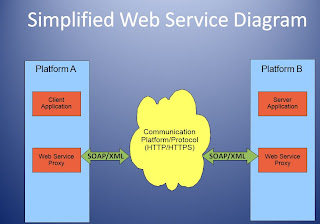

I discussed web services in a previous blog post so this time I would just like to share a couple links to explain how there services fit in with Internet Technologies.

Two major classes of Web services are identified, REST-compliant Web services, in which the primary purpose of the service is to manipulate XML representations of Web resources and "Big" Services that uses XML and follow SOAP standards that are popular in Enterprise.
Today, there is another type of webservice that we are seeing more and more of. That is Web 2.0. Web API or Web 2.0 includes the read/write web, blogs, wikis, podcast and cloud computing. The use of web base "office" products (word processing, spreadsheets, etc) and the use of Web Servers like Amazon Web Services.
If you wanted to start a small company, you could potentially do the following: Buy computers with good internet access and use all web based products. You could store all of your data on a Web Server like Amazon Web Services without buying your own servers. You could get all of your company email to go through a web based mail client like GMail. You would not have to buy MS Office because you could use Google Docs or Zoho for all of your productivity needs. And you could build your own company website on web based, template based product like Google Sites or Weebly.

Data
Databases are software product whose primary function is to store and retrieve data as requested by other software applications, be it those on the same computer or those running on another computer across a network (including the Internet). There several different companies who make database software with Microsoft's SQL server and Oracle being the most widely used. These database products are aimed at different audiences and for different workloads (ranging from small applications that store and retrieve data on the same computer, to millions of users and computers that access huge amounts of data from the Internet at the same time).


Data includes email, web pages, audio files, video files, basically every single bit of information you see on a webpage is data that has to be stored somewhere.
Applications
Web applications use web documents written in a standard format such as HTML and JavaScript, which are supported by a variety of web browsers.
In 1995 Netscape introduced a client-side scripting language called JavaScript allowing programmers to add some dynamic elements to the user interface that ran on the client side.
In 1996, Macromedia introduced Flash, a vector animation player that could be added to browsers as a plug-in to embed animations on the web pages.
In 1999, the "web application" concept was introduced in the Java language.
In 2005, the term Ajax was coined, and applications like Gmail started to make their client sides more and more interactive. A web page script is able to contact the server for storing/retrieving data without downloading an entire web page.
In 2011 HTML 5 was created, which provides graphic and multimedia capabilities without the need of client side plugins.
Through Java, JavaScript, DHTML, Flash, Silverlight and other technologies, application-specific methods such as drawing on the screen, playing audio, and access to the keyboard and mouse are all possible.
As you can see, web applications have moved from a static screen to animation and movement to audio, video and the ability for the user to interact.
The future of web applications is explemfied by online word processing, and "office suites", essentially, "cloud computing". Google Apps, Microsoft Office Live, and WebEx WebOffice are examples of the newest generation of web applications.
http://webtrends.about.com/od/webapplications/a/web_application.htm

http://www.acunetix.com/websitesecurity/web-applications.htm
In 1995 Netscape introduced a client-side scripting language called JavaScript allowing programmers to add some dynamic elements to the user interface that ran on the client side.
In 1996, Macromedia introduced Flash, a vector animation player that could be added to browsers as a plug-in to embed animations on the web pages.
In 1999, the "web application" concept was introduced in the Java language.
In 2005, the term Ajax was coined, and applications like Gmail started to make their client sides more and more interactive. A web page script is able to contact the server for storing/retrieving data without downloading an entire web page.
In 2011 HTML 5 was created, which provides graphic and multimedia capabilities without the need of client side plugins.
Through Java, JavaScript, DHTML, Flash, Silverlight and other technologies, application-specific methods such as drawing on the screen, playing audio, and access to the keyboard and mouse are all possible.
As you can see, web applications have moved from a static screen to animation and movement to audio, video and the ability for the user to interact.
The future of web applications is explemfied by online word processing, and "office suites", essentially, "cloud computing". Google Apps, Microsoft Office Live, and WebEx WebOffice are examples of the newest generation of web applications.
http://webtrends.about.com/od/webapplications/a/web_application.htm

http://www.acunetix.com/websitesecurity/web-applications.htm
Web Servers

A web server is a computer that has been set up but a hosting company usually housed in data center. The purpose of a webserver is to store websites until someone wants to visit them and then to quickly respond to the visitors browser with the sites content.
A server must be able to respond to multiple (sometime hundreds, thousands and even millions of requests).
Most servers use http (to handle websites), FTP (to handle file transfers), and email server and a database server to handle data storage and transfer.
This is also a great resource in understanding how web servers work: http://www.howstuffworks.com/web-server.htm
Internet Infrastructure
This video is a good illustration of how the Internet works and how information is transferred from one computer to another.
Basically the path of pulling up a webpage is: Your computer > router > ISP > router > Internet > router > website > router > ISP > router > your computer
A router exists along every intersection and every packet of information is moved via an IP address. An IP address is how the Internet gives locations of computers and routers. IP addresses are 4 sets of numbers in a combination between 0.0.0.0 and 255.255.255.255.
The internet is a global system of interconnected computer networks. All the computers connected to the internet are actually connected to each other through the Internet Service Providers (ISPs) which in turn are connected to the bigger routers or the backbone of the internet. The backbone is a large server where the data is exchanged. These backbones are connected to each other through fiber optical cables. The ISPs are connected to these backbones through fiber optic cables in order to minimize the transmission loss. Then the users are connected to ISPs through cables or wireless routers.

A router exists along every intersection and every packet of information is moved via an IP address. An IP address is how the Internet gives locations of computers and routers. IP addresses are 4 sets of numbers in a combination between 0.0.0.0 and 255.255.255.255.
The internet is a global system of interconnected computer networks. All the computers connected to the internet are actually connected to each other through the Internet Service Providers (ISPs) which in turn are connected to the bigger routers or the backbone of the internet. The backbone is a large server where the data is exchanged. These backbones are connected to each other through fiber optical cables. The ISPs are connected to these backbones through fiber optic cables in order to minimize the transmission loss. Then the users are connected to ISPs through cables or wireless routers.

Client Applications
Examples of Client Applications:
Web browers - clients that allow us to view the internet
MS outlook - mail client that allows you to get your email from an email server
MS messenger, Google talk, Yahoo Chat - online chat clients
Game clients - allow multiplayer games
Web browers are probably the most widely used client applications. A web brower requests services from a web servers and display those web pages for the viewer. There are currently a variety of browsers being used.

Web browers - clients that allow us to view the internet
MS outlook - mail client that allows you to get your email from an email server
MS messenger, Google talk, Yahoo Chat - online chat clients
Game clients - allow multiplayer games
Web browers are probably the most widely used client applications. A web brower requests services from a web servers and display those web pages for the viewer. There are currently a variety of browsers being used.

The following video is a very simplistic but great explaination of how the internet works: http://www.commoncraft.com/video/world-wide-web.
Friday, December 9, 2011
Future of the Internet
The Future Internet:
An evolving convergent Internet of things and services that is available anywhere, anytime as part
of an all-pervasive omnipresent socio–economic fabric, made up of
data
advanced services to business and citizens.This definition comes from "The Future Internet" Report from May 2011 complied by UK, Future of Internet Group.
This article outlines how the Internet is constantly evolving and most issues and concerns related to the Internet fall under 3 main categories: converged services, shared data and infrastructure.
Converged Services
Companies will want the ability to not only have a web page but for people to directly interact with it. This is already happening but trends are moving all websites to this direction. First we had webpages that showed what a store had, then you had the ability to purchase and find store locations. Going further, stores do and will have blogs for customers to share, places for customers to interact with customer service representatives and move to other websites that offers complimentary goods or services.
Shared Data
Customer data, patient data, shopping data, school related data - all online, all potentially available for customization, ease of data retrieval and ease of personalization. Technology companies are now moving toward offering cloud computing solutions to help move along all of this data, easier, faster and more efficiently.
These statistics are quite amazing to think about:
In 2006, the amount of digital information created, captured and
replicated was 1,288 × 1018 bits (161 exabytes or 161 billion
gigabytes). This is equivalent to about 3 million times the information in
all the books ever written.
• Between 2006 and 2010, the information added annually to the digital
universe was estimated to increase more than six-fold, from
161 exabytes to 988 exabytes (see Figure 8).
Images and video are
fuelling this growth
• Three major analogue-to-digital conversions are powering this growth:
film-to-digital image capture, analogue-to-digital voice, and analogueto-
digital TV.
• Images, captured by more than 1 billion devices in the world, from
digital cameras and camera phones to medical scanners and security
cameras, comprise the largest component of the digital universe. They
are replicated over the Internet, on private organisational networks, by
PCs and servers, in data centres, in digital TV broadcasts and on
digital projection screens.
Solutions to moving this amount of data has to be ever evolving.
Infrastructure
Connectivity, connectivity, connectivity! Everyone wants to be connected 24/7 from multiple devices. But how can a network handle this? At one time, no one thought we could ever run out of IP addresses with IP4 and sure enough we have. Implementing IPv6 and increasing access to wireless are going to be key. The number of handhelds has increased by 6 fold over the past 10 years. That number is believed to increase to 50 million connected devices by 2020. Will be have the capacity or will it all shut down?
The future....The important concept in this article I think is that of evolution. The Internet is constantly evolving. Companies, governments and people are going to have to learn new ways to use the Internet, support the Internet and make it work for the benefit of all.
Friday, November 11, 2011
Web Services
According to the Web Services Architecture Working Group, the phrase "Web Services" is defined as,
"a software system designed to support interoperable machine-to-machine interaction over a network. It has an interface described in a machine-processable format (specifically WSDL). Other systems interact with the Web service in a manner prescribed by its description using SOAP-messages, typically conveyed using HTTP with an XML serialization in conjunction with other Web-related standards." What??? First lets, define some of the acronyms. WSDL is Web Service Definition Language, SOAP is Simple Object Access Protocol, HTTP is Hypertext Transfer Protocol and XML is EXtensible Markup Language. To me this means that a Web Service is any program where machines talk to each other through appropriate languages and protocols.

SAP uses the above diagram to describe a web service.
What is a "Big Web" service and 'RESTful Web Service'?
The Diagrams below illustrate similarities and differences in "Big" vs "REST" Web Services.

http://www.crummy.com/writing/RESTful-Web-Services/

There appears to be a need for both types of Web Services depending on the needs of the company (open vs closed environments, mobile devices vs corporate desktops, ease of development vs the need for resources)
"a software system designed to support interoperable machine-to-machine interaction over a network. It has an interface described in a machine-processable format (specifically WSDL). Other systems interact with the Web service in a manner prescribed by its description using SOAP-messages, typically conveyed using HTTP with an XML serialization in conjunction with other Web-related standards." What??? First lets, define some of the acronyms. WSDL is Web Service Definition Language, SOAP is Simple Object Access Protocol, HTTP is Hypertext Transfer Protocol and XML is EXtensible Markup Language. To me this means that a Web Service is any program where machines talk to each other through appropriate languages and protocols.
SAP uses the above diagram to describe a web service.
What is a "Big Web" service and 'RESTful Web Service'?
Big Web Services | -follow SOAP standard -XML language for defining interface | -mostly used in Enterprise and closed environments -more complex to develop and implement | -used by Google |
RESTful Web Services | -HTTP -number of languages -open source | -simple -recently the more predominant web service -easier to build | -Amazon Web Services -Good choice for Mobile devices |
The Diagrams below illustrate similarities and differences in "Big" vs "REST" Web Services.
http://www.crummy.com/writing/RESTful-Web-Services/
There appears to be a need for both types of Web Services depending on the needs of the company (open vs closed environments, mobile devices vs corporate desktops, ease of development vs the need for resources)
Thursday, November 10, 2011
Mobile App Development
This week in class we had a guest speaker, Chuck Hudson from Control4 speak about mobile application design. He was very interesting and gave a great presentation.
He started his talk by telling us that the term 'mobile device' doesn't just mean smart phone anymore. The mobile device market includes phones, ipads, tablet, car displays, integrated pandora in cars, etc.

Key points from his talk:
- Android is growing much faster over the past 3 mo. According to nielsen
- Android has taken over smart market in the UK according to guardian
- Ads are mostly for iphones or android
- Apps - some make money purely from people purchasing the app - angry birds
- Some free apps - make money from ads - ie. you have to watch ad in order to get to the next level, etc.
- Companies are keeping track of what they sell through their apps (opposed to their websites)
- Mobile apps - about 1/3 of all apps never get launched more than once so companies and developers have to figure out how to make them so people will continue to come back to them.
Looks , orientation, larger realestate with tablets than on a phone
1 screen on a tablet - 2-3 screens on a phone - so do you make 1 app or 2?
Envision how customer will use - 1 handed or 2 handed, with thumb - thumb dynamics - where do you position the buttons, etc.
- As a developer, it is very import to do some storyboarding - gives you an idea of the live of the app from beginning to end
- An app should do one thing really really well rather than do many thing kind of well
Balsamiq - use for app development - quicker than omnigraffle - but omnigraffle good for storyboarding
Apple hig - for ios app development
Challenges - mobile - size constraints, etc
- Device can always over ride the app
- Support for multiple devices
- Great place to learn and gather resources:
Apple conference
Most info is online if you can't attend
Android challenges - relatively young
- Because it is so open, you don't always know what you will get - support for different resolutions and sizes - 4 general sizes - 4 dpi of interface - combination of these 2 allows you to create a layout on different devices (scaling, button placement)
- Detailed instructions on android developers site
- In the early days if android, there was no graphical layout, but now there is.
ios - older, more mature - use xcode and instruments - for building an app
How will you measure success? How many installs, how many upgrades, etc.
The future of Mobile Development is webbased mobile apps - could be the next big thing - html 5 is changing this area.
I loved hearing Chuck, it sounds like a very exciting field. These days, almost everyday, you hear the phrase, "and there's and app for that". It looks like the possibilities are endless.
Subscribe to:
Posts (Atom)